How to Disable Blocking for Specific Accounts
SprintWork operates system-wide by default, meaning any applied block lists or time restrictions affect everyone who logs onto the machine. However, if you are configuring a shared family computer or a communal office workstation, you may want to exempt certain individuals (like parents or administrators) from these rules.
Adding Users to the Exclusion List
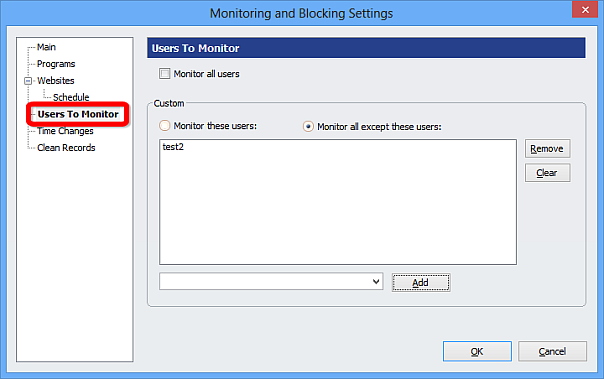
To exclude specific Windows user accounts from all tracking and blocking policies, open the SprintWork dashboard, navigate to 'Monitoring Settings', and select the 'Users To Monitor' tab.
Check the radio button labeled "Monitor all except these users". You can then manually type the Windows account username or select it from the provided drop-down list to add them to the exclusion policy.