How to Remove Ads From All Websites With SprintWork
Why Block Ads?
Advertisements are more than just annoying visual clutter that disfigures web pages and ruins your reading experience—they represent a significant breach of your online privacy. Many websites use embedded scripts and "cookies" to track your activity across the internet in order to serve relevant ads. This means advertising networks are actively logging your browsing history and sharing it with third parties, often without explicit consent.
Furthermore, video and animated flash banners consume massive amounts of system memory and bandwidth, slowing down your computer. These ads can sometimes also be hijacked to display inappropriate, explicit, or disruptive content that you would rather avoid entirely.
The SprintWork Ad-Blocking Advantage
Most traditional ad blockers work retroactively by parsing a web page's code after it starts loading, searching for specific patterns or hiding elements using CSS. SprintWork operates differently.
While originally designed to block online distractions and games, SprintWork's powerful web blocking engine can be leveraged to block known advertising servers and URLs before they are even requested. This proactive approach saves the bandwidth and computer resources that would otherwise be used to download and analyze those advertising scripts and images, considerably increasing your internet speed and protecting your privacy.
Setting up SprintWork to Block Ads
Follow these steps to import our curated block list, which effectively eliminates all ads and tracking code across web pages, including YouTube video ads and flash adverts.
- Download and install SprintWork if you haven't already. (The setup file is available here.)
- Download the custom SprintWork ad-server block list file (right-click the link and select "Save As..."):
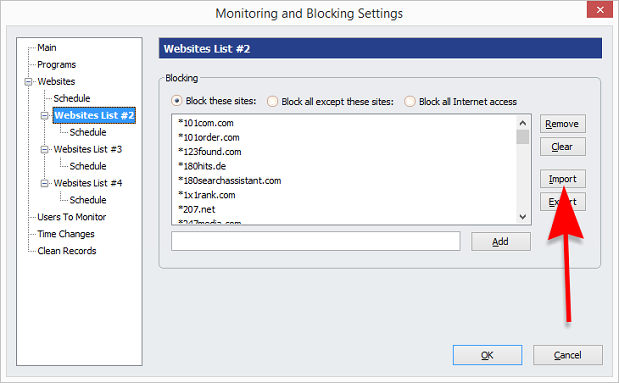
- Open the SprintWork Viewer, go to "Blocking Settings", select a secondary website blocking list, and then import the block list file you just downloaded.
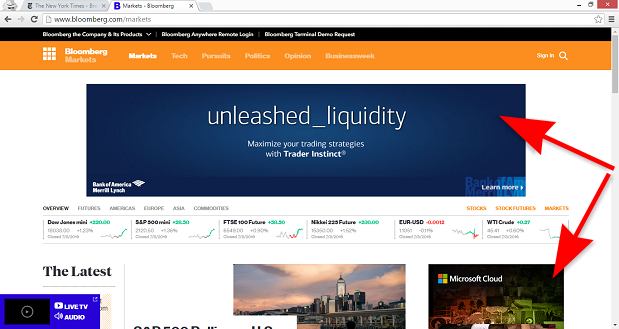
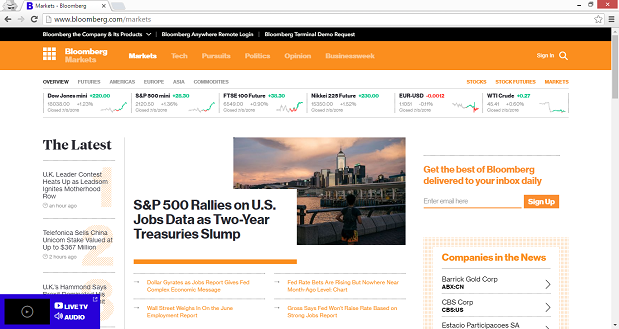
Visual Results: Before vs. After