Adding or Removing Websites from the Block List
SprintWork's core feature is its customizable website blocking engine. By explicitly defining which websites are off-limits during your working hours, you can effectively eliminate digital distractions like social media and news feeds.
Modifying Your Lists
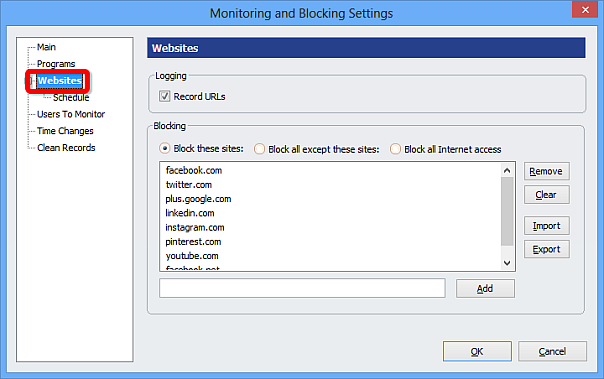
To add a new website to the blocking list, or to remove a previously blocked site, open the SprintWork dashboard, navigate to 'Blocking Settings', and then select the 'Websites' tab.
Here, you can easily add or remove any URL to your active lists. You can also modify the blocking schedules as required.
Using Wildcards
SprintWork supports the use of wildcards (e.g., asterisks `*`) within website addresses. This provides granular control, allowing you to block entire domains, specific sub-domains, or any URL containing a specific keyword (e.g., `*facebook*`).