HomeGuard Website Blocker
Block Any Website by Name, URL, or Keyword
Establish precise rules for addictive gaming platforms, social networks, or any custom domain you choose to restrict.
Direct Domain Blocking
Block websites quickly by entering their name, full URL, or associated keywords. You can also restrict specific file downloads (like .exe or heavy media files) through content-type filtering.
Detailed Web Activity Logs
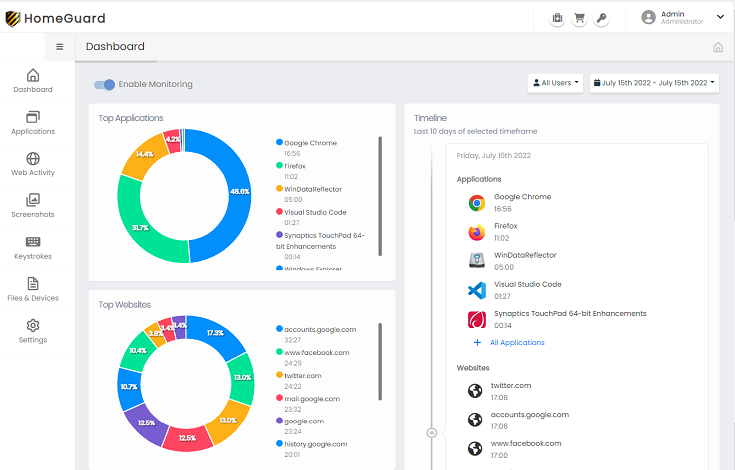
Generate comprehensive reports detailing the exact time a website was visited and the total duration spent actively engaged with the page.
Search Engine Oversight
The built-in web filter monitors and securely records all terms queried across major search engines including Google, Yahoo, and Bing.
Smart Content Filtering
HomeGuard can analyze page content in real-time, blocking individual pages containing inappropriate material while leaving the rest of the safe domain accessible.
Encrypted HTTPS Filtering
Modern websites use encryption, but HomeGuard's advanced engine can reliably filter and apply blocking rules even on secure HTTPS connections.
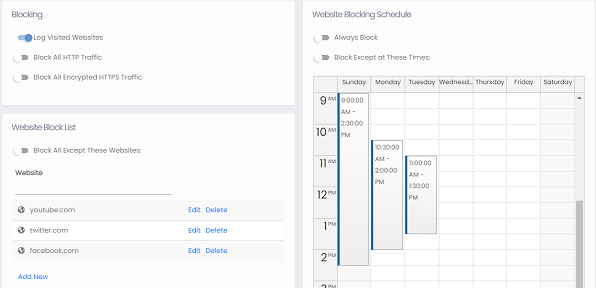 Configure custom whitelists, blacklists, and daily schedules.
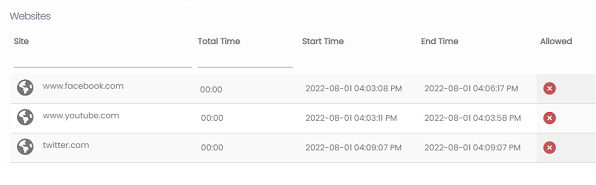 Easily manage access to social networks.
Enforce Rules Across All Applications
HomeGuard operates at the system level. This means its website blocking capabilities extend beyond standalone browsers (like Chrome or Edge) and apply to embedded plugins, communication apps, and even P2P clients. Furthermore, it actively resists circumvention attempts, applying filtering rules even if a user tries to route their connection through a proxy server or tunneling application.
Stealth Operations
Monitor and filter web traffic completely silently. The software remains hidden from standard task managers, ensuring uncompromised and natural browsing data.
Tamper-Proof Design
HomeGuard cannot be disabled, uninstalled, or bypassed without the administrative master password established during the initial setup process.
Offline Capability
Unlike cloud-dependent solutions, blocking rules and schedules are processed locally, ensuring protection remains active even if the network connection drops.
Targeted User Monitoring and Restrictions
Customize HomeGuard to fit your exact needs. Choose specifically which Windows user profiles the blocking rules apply to, and define unique access schedules (specific days or hours) for different members of your family or organization.
Frequently Asked Questions
Common questions regarding HomeGuard's web filtering capabilities.
No. HomeGuard operates at a low system level, inspecting network traffic directly rather than relying on browser extensions. This allows it to effectively block access to proxy sites and intercept traffic before it can be routed through most VPN applications.
You have control over this. By default, HomeGuard displays a block page when a user attempts to access a restricted site. However, you can choose to enable stealth mode, which silently drops the connection, making it appear as though the website is simply unavailable.
Yes. Because HomeGuard analyzes the actual network packets rather than the browser's history logs, it can seamlessly monitor and block traffic regardless of whether the user is utilizing Incognito Mode, Private Browsing, or portable browsers.
There is no practical limit. You can manually add as many specific domains or keywords to your custom blacklist as you need without degrading system performance.
Highly Rated Software
"It's easy for you to use and hard for others to detect or remove."

CNET Download.com
"A monitoring tool that keeps you on top of every situation."
Softpedia.com
"Out of the box, HomeGuard Activity Monitor is massively impressive."
Softonic.com
Intelligent Web Filtering
Dynamic Content Analysis
Go beyond simple URL blocking. HomeGuard's smart engine evaluates page content dynamically. If an otherwise safe community forum suddenly hosts unapproved or explicit material, HomeGuard will automatically detect the keywords and block access, requiring zero manual updates from you.