Restrict Computer & Internet Usage
Establish Healthy Digital Boundaries and Prevent Screen Addiction
Take complete control over when and how long computers and the internet can be accessed. Enforce healthy routines effortlessly.
Flexible Scheduling by Day and Hour
Create precise schedules tailored to your family's routine. Block internet access during homework hours, enforce strict bedtime cut-offs, or allow unlimited usage only on weekends. You can set different rules for different Windows user accounts.
Daily Usage Quotas (Time Allowances)
Instead of strict clock times, you can allocate a specific amount of time per day. For example, grant a user exactly 2 hours of daily internet or gaming time, allowing them to manage when they spend it within your predefined safe windows.
Targeted App and Game Management
Time limits aren't just for the whole computer or network. Apply specific restrictions to notoriously distracting games or applications without affecting access to educational software or necessary communication tools.
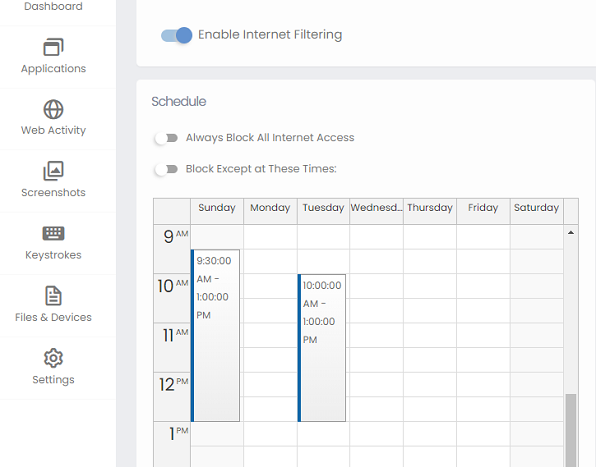 The intuitive grid interface allows you to easily block or allow access in 15-minute increments across the entire week.
Unbeatable, Tamper-Proof Time Enforcement
Tech-savvy children often try to bypass parental controls by changing the computer's system clock. HomeGuard anticipates this. Our software includes robust anti-tampering mechanisms that prevent standard users from modifying the system time or date to gain extra usage minutes. If an unauthorized attempt to change the time is detected, HomeGuard overrides it and maintains the correct schedule.
Furthermore, HomeGuard operates at a deep system level in complete stealth mode. Unlike basic browser extensions or visible tray applications, it cannot be closed via the Task Manager, bypassed using Safe Mode, or uninstalled without the master administrative password. When time is up, the restriction is enforced absolutely.
Granular Control: System vs. Network
HomeGuard gives you the flexibility to choose exactly how you want to limit screen time, recognizing that a computer isn't just an entertainment device—it's often a necessary tool for homework.
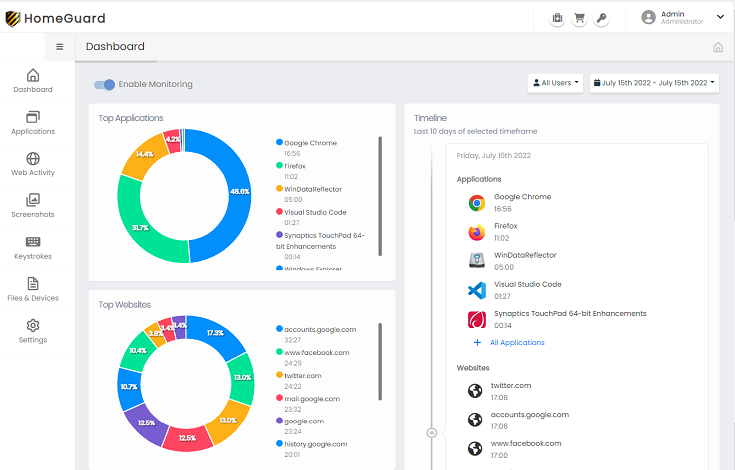
Combine program blocking with daily time quotas to ensure games are only played after responsibilities are met.
Highly Rated by Top Software Reviewers
"It's easy for you to use and hard for others to detect or remove. The scheduling features are robust and reliable."

CNET Download.com
"A monitoring tool that keeps you on top of every situation. The time restrictions apply flawlessly without slowing down the PC."
Softpedia.com
"Out of the box, HomeGuard Activity Monitor is massively impressive. It offers granular control over when the computer can be used."
Softonic.com
Versatile Parental Control Tools for Family Safety
Operates Securely and Seamlessly
Comprehensive time management tools combined with detailed activity reporting empower you to keep track of computer usage, enforce healthy boundaries, and guide your family toward better habits before screen addiction becomes an issue.